
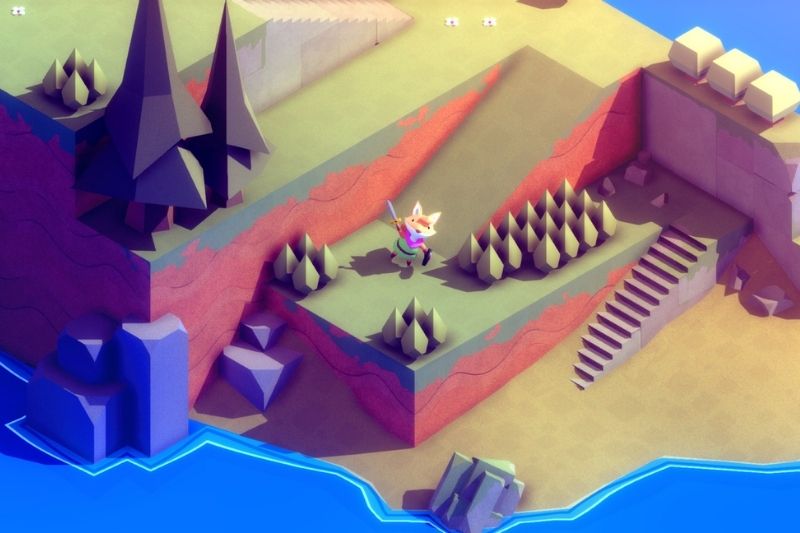
TUNIC is a charming game about a small fox on a big adventure. Stranded in a ruined land, and armed with only your own curiosity, you will confront colossal beasts, collect strange and powerful items, and unravel long-lost secrets. It's an isometric action game with difficulty that walks the razor's edge of being punishing and rewarding. It doesn't disrespect your time or pound you to dust. It has a rich, foreboding soundtrack by Lifeformed and Janice Kwan.
It's a joy to play. You play as a small fox with a big heart and a big world to explore. You'll come across colossal beasts, strange and powerful items, and long-lost secrets. TUNIC can be played as a lighthearted adventure or as a tense, challenging combat game. The only limit is your imagination. TUNIC is an upcoming isometric action game about a small fox who embarks on a big adventure. The player will explore a hostile, intricately connected world where they fight epic bosses, uncover ancient secrets and collect treasure to help them on their way. TUNIC is a challenging game which rewards patience and perseverance, and is full of secrets to discover.
Step-by-Step Guide How to Play TUNIC
1. Run TUNIC
2. Click Play
3. Click the Right Thumbstick to move
4. Press A to jump
5. Press B to pick things up
6. Press Y to throw
7. Press X to use items
8. Press Left Thumbstick to look around
9. When you get to a new area, press Start to open the map

 How to Play TUNIC Game?
 Best Games Similar to TUNIC